
Enhancing Primary Science
- primarytechreview

- Aug 28
- 6 min read
Updated: Oct 5
Technology has the potential to both enhance and transform primary Science. Using technology, children can work more accurately and record data, leading to further questions and experiments. They can use technology to view models of things in the world and universe, and use technology to identify some of the plant and animal species they encounter.
I have linked some of the most useful apps and websites for primary Science to the objectives in the English national curriculum.
iPad photography
iPad photography is a simple but powerful tool for primary Science lessons. Photography encourages children to look closely, which naturally leads to observations and questions. iPads are particularly well suited to primary-age photography due to their ease of use, large display screen and ability to focus on tiny details, as well as capture time lapse and slow motion videos.
Children can zoom in on an iPad by moving their fingers apart on the camera screen. Many don't realise that they can then tap anywhere on the screen to focus the camera. In this way, they can take incredible photos showing the details of plants, insects and results of experiments. Children can combine their scientific photographs with artwork, either editing the photos directly, labelling them or using them as inspiration for painting.
Slow motion video allows children to make observations of their bodies, muscles and movements, with possible links to PE. Children can also use slow motion video to record their experiments, for example, seeing changes and reactions in more detail.
Timelapse videos can be used to show changes over time, such as seeds germinating and growing or clouds changing.

Year 1
identify and name a variety of common animals including fish, amphibians, reptiles, birds and mammals
describe and compare the structure of a variety of common animals (fish, amphibians, reptiles, birds and mammals, including pets)
observe changes across the four seasons
observe and describe weather associated wit the seasons and how day length varies
Year 2
observe and describe how seeds and bulbs grow into mature plants
Year 3
Identify and describe the functions of different parts of flowering plants: roots, stem/trunk, leaves and flowers
Year 5
demonstrate that dissolving, mixing and changes of state are reversable changes
Scale of the Universe 2
Scale of the Universe 2 is available as both a website and a paid app for iPads. The website version runs well, but features some ads. Scale of the Universe 2 allows children to zoom in and out and view objects from the subatomic scale to the universe! It is a tool that is fun to explore as a class. Clicking on objects displays funny an informative captions about them. Zooming in and out in this amazing app/website is sure to generate curiosity and questions, leading to possible investigations and a love of science!
Year 5
describe the movement of the Earth, and other planets, relative to the Sun in the Solar System
Universe Sandbox 2
Universe Sandbox 2 is a 3D simulation of objects in space. It includes planets, moons, stars, black holes and terrestrial objects such as melons, cows and whales. Children can use Universe Sandbox 2 to simulate how these objects interact with each other due to gravity and motion. They can view planets change as they get hotter or colder, see stars change as they get more massive or change temperature and see the results of bodies colliding with each other!
To run, Universe Sandbox will need a gaming computer, so schools will have to decide whether to invest money in this and other educational software. I have written a blog post about using gaming software in education here.
Year 5
describe the movement of the Earth, and other planets, relative to the Sun in the Solar System

Sparkvue data loggers
The English national curriculum requires children to collect data in Science lessons with increasing accuracy, mentioning data loggers specifically. Data collection also forms part of primary Maths objectives, presenting opportunities for cross curricular learning in Science lessons.
Sparkvue data loggers, by Pasco, are suitable for use in primary and secondary schools. The sensors include heartrate sensors, temperature sensors, PH sensors and CO2 sensors. The sensors can be connected to iPads or PCs wirelessly. The sensors are expensive, but reliable and easy to connect to devices and the graphs generated are accurate. It may be that a school wished to purchase enough temperature sensors for children to use in pairs, as well as a couple of the more expensive sensors such as PH or CO2 sensors for demonstration and whole class use.
Sparkvue sensors are the most accurate sensors I have sued in schools, with the power to transform the types of experiments and data logging that children do.
Year 2:
Find out and describe how plants need light, water and a suitable temperature to grow and stay healthy
Year 3 and 4 (working scientifically):
Make systematic and careful observations and, where appropriate, take accurate measurements using standard units, using a range of equipment, including thermometers and data loggers
Year 5 and 6 (working scientifically):
Take measurements, using a range of scientific equipment, with increasing accuracy and precision, taking repeat readings where appropriate

Arduino Science Journal
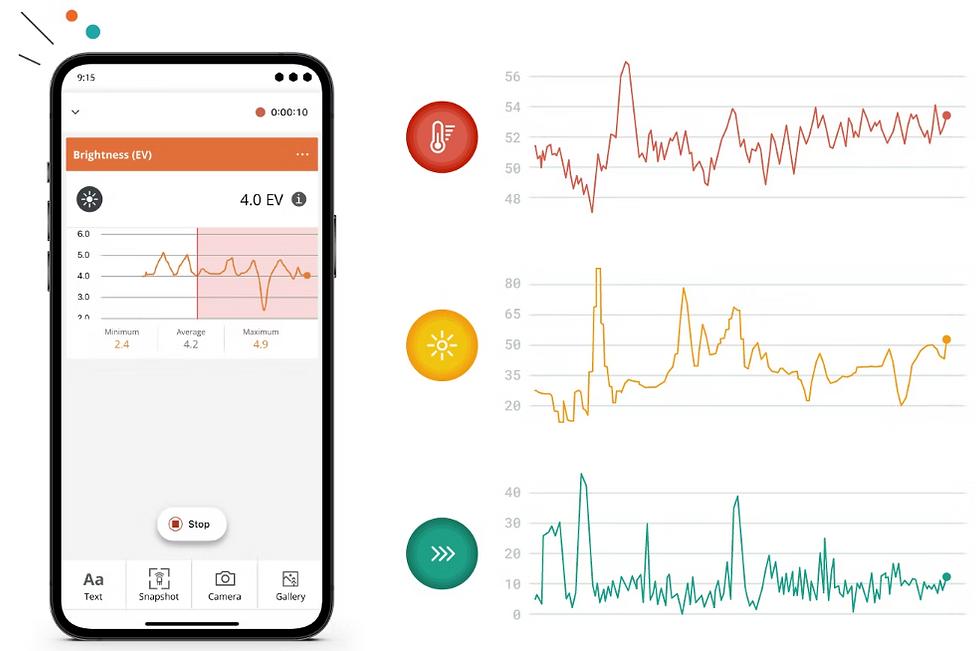
Arduino Science Journal (formerly Google Science Journal) is a free iPad app that allows children to record data from the iPad sensors. Data can be collected about light, sound and movement. The app can be sued like a digital Science journal, meaning that children can set up an experiment, record data from the sensors, add their own observations, add photographs and comments and export their work. In this way, children can act like scientists in the primary classroom.
The app is transformative, empowering and designed for primary/secondary-aged children and well worth investing the time required to train children to use it properly.
Periodic Table by the Royal Society
Periodic Table is a free app that children can use to find out about the elements in the Periodic Table of elements. They can learn about elements in whatever depth they like, form looking at the pictures and videos, to reading about uses of elements, density and grouping. The app is clear and easy to use, and children I have used the app have enjoyed using to to learn and ask questions.

Crumbles
Crumbles, by Redfern electronics, can be used to teach children about programming components such as motors and LEDs to operate. This is known as 'physical computing'.
While learning about circuit design and programming, children also learn about electrical circuits. As shown in the diagram below, components in a Crumble system need a positive and negative charge from the battery, this is provided through the Crumble. An additional data wire, shown below in green, tells the components when to turn on and off using block-based programming.
Crumble circuits look different from the traditionally shown circuits that children will be expected to recognise for Key Stage 2 Science. However, using Crumbles at the same time as teaching circuits in Science allows children to apply their understanding of Science, Computing and design, as they design and build devices that use the electrical components.
Year 4:
Construct a simple series electrical circuit, identifying and naming its basic parts, including cells, wires, bulbs, switches and buzzers.
Year 6:
Use recognised symbols when representing a simple circuit in a diagram


Lego Spike Prime
Lego Spike Prime is the name of the most modern Lego robotics sets designed for use in education. The sets allow children to program motors and sensors and combine these to build robotics systems.
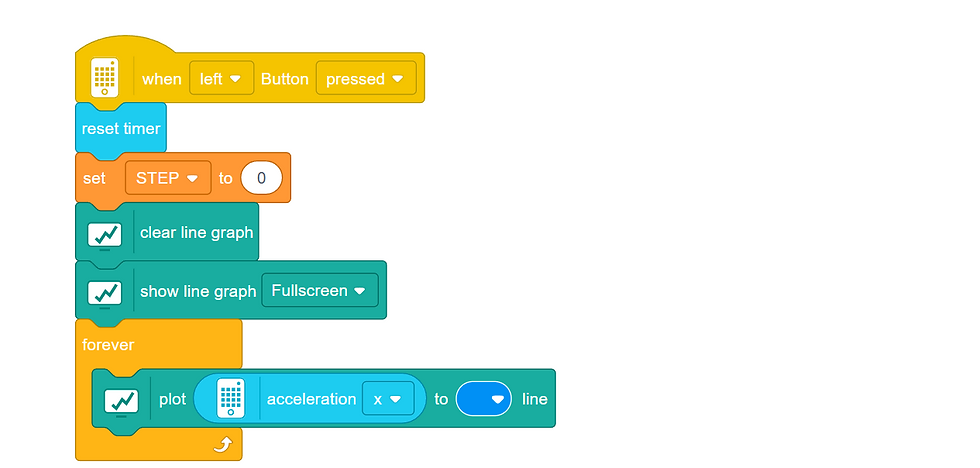
One feature of the Spike Prime sets is the ability to generate and collect data. As shown in the code below, children can program graphs to display metrics such as acceleration.
This is a fairly advanced project and maybe most suitable for children in Upper Key Stage 2. Devices such as step counters or simple movement experiments could be used to allow children to collect data about forces.
Year 6:
Recognise the impact of diet, exercise, drugs and lifestyle on the way their bodies function
Tinkercad
Tinkercad is mainly used as a 3D design tool. It is idea for children at primary-age to combine 3D shapes and make more complex structures.
Another feature of Tinkercad is the 'Circuits' section. Here, children can build and test electrical circuits, including common electrical components.
Children can add components including batteries, lamps, LEDs, resistors, switches and sensors. They can even add potatoes and lemons and record how much electricity is generated!
This should not be a substitute for experimenting with real circuits, but can be a good place for experimentation and collecting precise data.
Year 6:
Use recognised symbols when representing a simple circuit in a diagram


Comments